

Medical Billing Software: What to Look for Before You Buy
The Qualigenix Editorial Team consists of certified billing and coding experts with over 40 years of experience across 38+ medical specialties. Our content is rigorously researched against CMS, AMA, and payer-specific guidelines to ensure total compliance and accuracy. We apply the same elite standards to our resources as we do our client work, consistently delivering high claim accuracy and significant reductions in AR days.

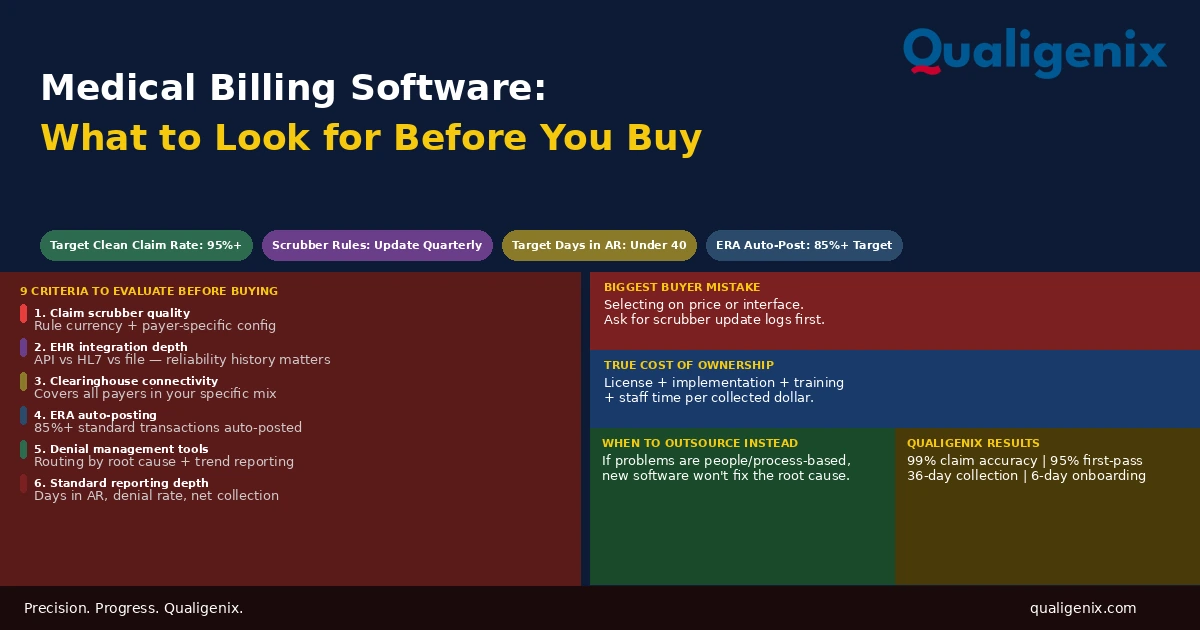
Medical billing software is not a revenue cycle solution. It is a tool that enables a revenue cycle solution. The platform that produces a 95% clean claim rate in one practice produces an 82% clean claim rate in another not because the software changed but because the people configuring it, maintaining its edit rules, working its denial queue, and managing its reporting are different. Selecting billing software requires evaluating specific capabilities: scrubber quality, EHR integration depth, clearinghouse connectivity, denial management workflow, reporting depth, and specialty-specific functionality. Price is a factor. It is not the most important one. The most important factor is what the software does to the practice’s revenue cycle performance when it is running at full utilization and whether the practice has the operational capacity to run it there.
Medical billing software selection is a decision that practices often make based on the wrong criteria. They look at the demo. The interface is clean. The sales rep shows a claims dashboard with real-time metrics. The EHR vendor’s preferred billing partner offers a discount on the bundle. The price is lower than the alternatives. The contract is signed.
Eighteen months later, the clean claim rate hasn’t changed. Denials are being worked the same way they were before the software switch. The reporting module produces reports no one knows how to interpret. The EHR integration broke during an update six months ago and no one fixed it because it required a technical ticket and no one submitted one. The software is newer. The billing operation is producing the same results it was before.
Billing software selection done correctly starts with a clear understanding of what the software must do, what the practice must do to make it work, and where the gap between those two things will produce the performance shortfall that shows up in the AR aging report. This blog covers what every practice should evaluate before selecting a medical billing platform.
Medical billing software manages claim submission, payment posting, denial tracking, and AR reporting. The most consequential evaluation criteria are claim scrubber quality and update frequency, EHR integration depth, clearinghouse connectivity breadth, denial management workflow tools, and the reporting capability to track days in AR, clean claim rate, denial rate by reason code, and net collection rate. Software that scores well on all five delivers measurably better revenue cycle outcomes than software selected primarily on price or interface aesthetics.
Medical Billing Software: Key Benchmarks to Evaluate Against
| Metric | Target Benchmark | Warning Level |
|---|---|---|
| Clean claim rate | 95% or higher | Below 90% |
| First-pass acceptance rate | 95% or higher | Below 88% |
| Days in AR | Under 40 days | Above 50 days |
| Denial rate | Under 5% of submitted claims | Above 10% |
| Net collection rate | 95% or higher | Below 90% |
| ERA auto-posting rate | 85%+ of standard transactions | Below 70% |
| Charge entry lag | Within 24 hours of encounter | Beyond 48 hours average |
| Scrubber rule update frequency | Quarterly minimum | Annual or less frequent |
| Implementation timeline | 60 to 90 days for most practices | Beyond 120 days signals complexity |
| Qualigenix claim accuracy rate | 99% | N/A |
| Qualigenix first-pass acceptance rate | 95% | N/A |
| Qualigenix average collection cycle | 36 days | N/A |
| Qualigenix AR days reduction for clients | 30% improvement | N/A |
What Medical Billing Software Actually Does
Before evaluating features, understanding what billing software is and isn’t responsible for in the revenue cycle removes the unrealistic expectations that produce disappointment after implementation.
Billing software manages the administrative workflow of the claim lifecycle: receiving coded charges, building claims from those charges, scrubbing claims for errors, transmitting them to payers, receiving payer responses, posting payments and adjustments, queuing denials for follow-up, and generating reports on the performance of the overall cycle.
What billing software does not do: it doesn’t make coding decisions. It doesn’t ensure providers document at the appropriate complexity level. It doesn’t call payers to follow up on aging claims. It doesn’t appeal denials. It doesn’t manage accounts receivable strategically. It doesn’t track provider credentialing or payer enrollment status. All of these functions require people operating the software with knowledge, judgment, and follow-through that the software cannot replace.
The most common medical billing software disappointment is buying a platform with excellent capabilities and discovering that those capabilities only produce results when skilled people configure, operate, and maintain them. A claim scrubber with 2,000 edit rules only catches errors that are in its rule library and only if the rules have been updated to reflect current payer requirements. A denial management module only works if someone reviews the denial queue and takes action. Billing software amplifies the capabilities of a billing team. It cannot substitute for one.
Evaluation Criterion 1: Claim Scrubber Quality and Rule Currency
The claim scrubber is the most revenue-consequential module in any billing software. It sits between the coded charge and the payer, reviewing every claim for errors that would cause rejection or denial before the claim is transmitted. A scrubber that catches errors internally saves the time and cost of working payer-returned rejections. A scrubber that misses errors allows them to reach payers, where they become denials requiring more effort to resolve.
When evaluating a billing platform’s scrubber, the key questions are specific:
How frequently are scrubber rules updated? Payer edit requirements change continuously. CMS updates its claim processing edits with every quarterly update. Commercial payers add and modify their own edit rules throughout the year. A scrubber running on rules that were last updated six months ago is missing several months of changes to the payer landscape. The vendor should be able to document a specific update schedule: how frequently rules are updated, from what source (CMS updates, payer-specific policy documents, clearinghouse edit libraries), and how updates are deployed to the platform.
Can scrubber rules be configured for specific payers? Generic scrubbers apply the same rule set to all claims regardless of the destination payer. Payer-configurable scrubbers allow rules to be set differently for different payers, reflecting that what one payer accepts another will reject. A practice with 15 active payers in their mix has 15 potentially different sets of claim requirements. A scrubber that applies one rule set to all 15 is under-configured from day one.
Warning: Billing software vendors routinely cite their scrubber’s rule count as a quality indicator: “Our scrubber has over 3,000 edit rules.” Rule count is not the relevant measure. Rule currency and payer specificity are. A scrubber with 3,000 rules that haven’t been updated in eight months is missing the most recent CMS quarterly edits, any commercial payer policy changes from the past two quarters, and all new Medicare Advantage plan-specific requirements added since the last update. Ask for the update log, not the rule count.
Evaluation Criterion 2: EHR Integration Depth
Most practices using separate EHR and billing platforms rely on an integration to transfer data between them. The quality of this integration is the most underestimated factor in billing software selection. An integration that works well eliminates data rekeying, reduces demographic errors on claims, and allows charge data to flow directly from clinical documentation to billing without a manual intermediary step.
An integration that works poorly — or that is technically present but incomplete — creates ongoing administrative overhead. Staff must compare EHR records against billing records to identify discrepancies. Charges entered in the EHR don’t appear in the billing system on time. Demographic updates made in one system don’t propagate to the other. Patient insurance changes captured at registration don’t update the billing record for claims already in progress.
When evaluating EHR integration, the key questions are:
What integration method is used? Native API integrations built by the two vendors together are typically the most reliable. HL7 interface-based integrations are standard and well-supported but require configuration. File-based integrations (CSV or flat file transfer) are the most brittle and require the most manual monitoring. The integration method tells you something about the depth of commitment both vendors have made to the connection.
What data flows in which direction? At minimum, the integration should transfer patient demographics and insurance data from the practice management system to the billing platform, and charge data from the EHR to the billing platform. A bidirectional integration that also flows payment status information back to the EHR gives clinical and administrative staff a unified view of each patient’s billing status without switching systems.
What is the integration’s history of reliability? Ask the vendor for documentation of integration-related support tickets from current customers. Ask current customers directly whether the integration has broken during platform updates and how quickly issues were resolved. An integration that breaks during routine software updates and takes weeks to restore is an ongoing operational liability.
Evaluation Criterion 3: Clearinghouse Connectivity Breadth
Billing software submits claims to payers through a clearinghouse. The breadth of the clearinghouse’s payer network determines how many of the practice’s payers can receive claims electronically and how many require fallback to manual or paper processes. Electronic claim submission is faster, more traceable, and produces lower rejection rates than paper. A clearinghouse that doesn’t connect to a significant portion of the practice’s payer mix creates ongoing manual submission overhead.
Most major billing platforms connect to one or more large clearinghouses Change Healthcare, Availity, Trizetto that cover the vast majority of commercial and government payers. The relevant evaluation is not whether the clearinghouse exists but whether it connects to every payer in the specific practice’s mix, including smaller regional plans, specialty Medicaid managed care organizations, and Medicare Advantage plans specific to the practice’s operating geography.
The clearinghouse connection also determines how electronic remittance advice flows back into the billing system. A robust clearinghouse connection delivers ERA files automatically, posts them to the correct claims, and routes denial information to the denial management queue without manual intervention. A weak or manual ERA process forces staff to download files, upload them separately, and reconcile ERA data against claim records by hand — adding hours per week that should not exist in a modern billing operation.
Evaluation Criterion 4: Denial Management Workflow Tools
Denial management is where most billing platforms show the largest gap between what they promise in a demo and what they deliver in practice. Every billing platform has a denial queue, a list of claims that came back denied from payers. The question is what the platform does with that queue beyond displaying it.
Effective denial management in billing software requires several specific capabilities that not every platform provides at equal quality.
Denial Categorization by Root Cause
Denials should be automatically categorized by reason code and routed to the appropriate queue based on the type of denial. Administrative denials go to the billing team. Medical necessity or clinical denials should flag for physician involvement. Credentialing denials should alert the credentialing coordinator. Authorization denials should route to the PA management team. A platform that puts all denials in a single undifferentiated queue forces manual triage that slows resolution and loses the pattern information that identifies systemic upstream problems.
Denial Trend Reporting
A denial that appears once is a claim problem. A denial that appears fifty times in a month is a process problem. Billing software should surface denial patterns through trend reporting that shows denial volume by reason code over time, by payer over time, and by rendering provider over time. When a specific denial code spikes say, modifier 25 missing denials increase 30% month-over-month — the report should make that pattern visible without requiring a manual analysis of the denial queue to find it.
Appeal Letter Templates and Tracking
Denial appeals require documentation. Billing software should provide configurable appeal letter templates that populate with claim-specific data and allow for customization based on the denial reason. Appeals should be tracked from initiation through resolution so that the status of every pending appeal is visible, appeal deadlines are flagged before they expire, and the success rate of different appeal approaches can be measured over time.
Evaluation Criterion 5: Reporting and Analytics Depth
The reporting module of a billing platform determines how much visibility practice leadership has into the revenue cycle’s actual performance. Most billing platforms can produce reports. The relevant question is whether the reports produced answer the management questions that matter and whether they produce those answers without requiring manual data extraction or spreadsheet manipulation.
The essential reports a billing platform should produce without custom configuration:
| Report | What It Tells You | Why It Matters |
|---|---|---|
| AR aging by payer and bucket | Where AR is accumulating and at what age | Identifies collection delays and write-off risk |
| Days in AR trend | Whether average collection speed is improving or worsening | Leading indicator of billing efficiency |
| Clean claim rate by month | What percentage of claims pass payer edits on first submission | Measures coding and billing quality together |
| Denial rate by payer and reason code | Which payers deny most and why | Identifies systemic process problems by source |
| Net collection rate | What percentage of collectible revenue is actually collected | Most comprehensive revenue cycle efficiency measure |
| Charge lag report | Average time from encounter to charge entry | Identifies timely filing risk before it materializes |
| E/M code distribution by provider | Whether coding patterns suggest undercoding relative to benchmarks | Surfaces silent revenue loss with no denial signal |
| Payment posting lag | Average time from ERA receipt to payment posting | Identifies AR data accuracy problems |
When evaluating a vendor, request samples of these specific reports from existing customers at similar practice sizes. If the vendor cannot produce these samples or suggests they require custom report development at an additional cost, the platform’s standard reporting capability is insufficient for managing a revenue cycle at the level these metrics demand.
Evaluation Criterion 6: Eligibility Verification Integration
Real-time insurance eligibility verification is one of the highest-return features in billing software when it is used consistently. A 270/271 eligibility transaction query before every patient visit confirms the patient’s coverage is active, identifies their deductible and copay status, and flags any plan changes since their last visit — including the increasingly common scenario where a Medicare patient has switched to a Medicare Advantage plan that the practice’s billing records haven’t been updated to reflect.
Billing platforms vary significantly in how well this feature is implemented. The best implementations run eligibility checks automatically from the appointment schedule batching overnight checks on the next day’s schedule and surfacing any failed or changed coverage before the patient arrives. Weaker implementations require staff to manually initiate each check or check individually through the payer’s portal. The manual approach captures the same information but requires more staff time and misses more checks because the process depends on consistent human execution rather than automated workflow.
Related: Verify Medicare Eligibility for Providers
Evaluation Criterion 7: Specialty-Specific Functionality
General-purpose billing software handles the standard billing workflow for most specialties adequately. Specific specialties have billing requirements that general platforms handle inconsistently, sometimes poorly, and occasionally not at all without add-on modules or custom configuration.
Surgical and Procedure-Heavy Specialties
Surgical practices need global period tracking that identifies which post-operative visits fall within the global period and should not be separately billed, and which visits for new problems require modifier 24 to receive separate payment. Billing software without this capability requires manual tracking of global periods, which is error-prone at high volume and produces both compliance risk from global period violations and revenue loss from missed separately billable visits.
Oncology and Infusion Practices
Oncology and infusion billing involves drug buy-and-bill workflows where the practice purchases a drug, administers it, and bills under the medical benefit using HCPCS J-codes. The billing system must handle drug inventory reconciliation, lot number tracking in some payer contexts, and the specific billing rules for per-unit drug billing that differ from standard CPT-based fee schedule billing.
Mental Health and Behavioral Health
Mental health billing involves session-based billing with specific time thresholds that determine code selection, add-on code rules for combined psychotherapy and E/M services, and payer-specific coverage rules that vary significantly between commercial and government plans. Billing platforms that don’t handle these specialty-specific rules consistently produce systematic coding and billing errors in mental health settings.
Multi-Location and Multi-Provider Practices
Practices with multiple locations, multiple tax IDs, or multiple billing entities need billing software that clearly separates data and reporting by location while also providing a consolidated view across the practice. Software that conflates location-level data produces reports that don’t tell the practice where performance problems are geographically or organizationally concentrated.
Evaluation Criterion 8: Implementation Support and Training
The gap between a billing platform’s demonstrated capabilities and its delivered performance in the first year of operation is almost always explained by implementation quality and training depth. A platform that is configured correctly from go-live, with payer-specific scrubber rules set, ERA auto-posting configured, denial routing established, and reporting dashboards calibrated to the practice’s payer mix, performs significantly better from day one than the same platform implemented generically and configured incrementally over eighteen months while the billing team figures it out.
When evaluating vendors, ask specific questions about implementation: Who does the configuration? Is it the vendor’s implementation team or the practice’s staff following documentation? How long does a typical implementation take for a practice of your size and specialty? What training is included and in what format? What does ongoing support look like after go-live? Is there a dedicated support contact or a general support queue?
Implementation quality is a leading indicator of long-term satisfaction with billing software. A vendor that undersells implementation complexity to close a sale and then hands a partially configured platform to a billing team that wasn’t adequately trained is delivering a revenue cycle liability, not a revenue cycle tool.
Evaluation Criterion 9: HIPAA Security and Compliance
Medical billing software handles protected health information. It must comply with HIPAA security requirements including role-based access controls, audit logging, data encryption in transit and at rest, automatic session timeouts, and multi-factor authentication. For cloud-based platforms, the vendor must sign a HIPAA Business Associate Agreement and should be able to provide SOC 2 Type II audit documentation demonstrating their security controls have been independently verified.
Security evaluation is not optional and is not covered adequately by reviewing a vendor’s marketing materials. Ask for the BAA before signing any contract. Ask for their SOC 2 documentation. Ask about their breach notification process and incident response timeline. A billing platform that processes thousands of patient records per month without these controls is a compliance liability regardless of its billing performance metrics.
Total Cost of Ownership: What Most Practices Miscalculate
Billing software is typically priced as a monthly subscription (flat rate or per-provider fee), a per-claim fee, or a percentage of collections. The published price is rarely the full cost of operating the platform. A complete total cost of ownership calculation includes the subscription fee, implementation costs, training time for existing staff, ongoing training costs as staff turns over, technical support fees for issues beyond standard support, clearinghouse transaction fees, and the staff time required to operate the system at your volume per month.
The ROI calculation compares this total cost against the revenue improvement the platform is expected to generate: improved clean claim rate, faster payment posting, lower denial rate, better AR visibility. If the platform improves clean claim rate by 5 percentage points on a practice generating $5 million in annual claims, that improvement is worth roughly $250,000 in annual revenue that was previously lost to denials and resubmissions. A platform that costs $50,000 per year all-in and delivers that improvement has a compelling ROI. A platform that costs $50,000 per year but doesn’t change clean claim rate performance has no ROI regardless of its price relative to alternatives.
The most common total cost of ownership miscalculation in billing software selection is underestimating the ongoing staff cost required to operate the system. Billing software requires trained billing staff to function. If a platform requires 25% more staff time per month than the alternative due to manual workarounds, integration gaps, or denial management inefficiency, that staff cost differential often exceeds the price difference between platforms. Buy the platform that minimizes total staff time per collected dollar, not the platform with the lowest license fee.
When Billing Software Alone Is Not the Answer
Some practices evaluate billing software when what they actually need is a different revenue cycle model entirely. The symptoms that drive billing software evaluations — low clean claim rate, high denial rate, rising days in AR, unexplained revenue gaps — are sometimes software problems. More often, they are process problems, staffing problems, or credentialing problems that a new software platform will not resolve.
A practice with a 78% clean claim rate that buys new billing software and still has a 78% clean claim rate after implementation has confirmed that its clean claim problem was not its software. The problem is in the coding, the documentation, the registration workflow, or the payer-specific knowledge gaps in the billing team. Software can’t fix any of these.
For practices whose revenue cycle challenges run deeper than their software, outsourcing billing to a specialized RCM partner who brings both the platform and the people who know how to operate it is often a more direct path to improved performance than buying new software and trying to train an existing team to use it better.
At Qualigenix, we manage the full revenue cycle for practices across 38+ specialties: coding, claim submission, denial management, AR follow-up, and the credentialing and enrollment infrastructure that makes every claim valid from the start. We deliver a 99% claim accuracy rate, 95% first-pass acceptance rate, 36-day average collection cycle, and 30% reduction in AR days — results that reflect the combination of the right tools and the right people using them correctly.
Related: What Is RCM in Medical Billing | What Is Claim Submission in Medical Billing | Accounts Receivable Medical Billing | Medical Billing vs Coding: Key Differences
Medical Billing Software Evaluation Checklist
- Scrubber rule update frequency documented — quarterly minimum confirmed
- Payer-specific scrubber configuration capability confirmed for top 10 payers in practice mix
- EHR integration method identified — API, HL7, or file-based — and reliability history verified
- Data flow confirmed: demographics, charges inbound; payment status outbound
- Clearinghouse connectivity verified for all active payers in practice mix
- ERA auto-posting capability and auto-posting rate from existing customers confirmed
- Denial management queue includes root cause categorization and routing by denial type
- Denial trend reporting produces month-over-month comparisons by reason code and payer
- Standard reports include days in AR, clean claim rate, denial rate, net collection rate
- E/M code distribution report available by provider without custom development
- Eligibility verification runs automatically from appointment schedule
- Specialty-specific functionality verified for global period, buy-and-bill, or other specialty requirements
- Implementation timeline, scope, and included training documented in writing before signing
- HIPAA BAA signed and SOC 2 Type II documentation reviewed
- Total cost of ownership calculated including staff time, not just license fee
Frequently Asked Questions: Medical Billing Software
What is medical billing software?
Medical billing software manages the administrative workflow of building and submitting insurance claims, tracking payments, and collecting revenue for healthcare services. Core modules include eligibility verification, charge entry, claim scrubbing and submission, payment posting, denial management, and AR reporting. The platform’s performance depends on how well it is configured, how current its scrubber rules are, how deeply it integrates with the practice’s EHR, and how effectively the billing team uses its tools.
What is the most important feature in medical billing software?
The claim scrubber is the most revenue-consequential feature. Its quality and currency determine how many errors reach payers versus being caught internally before submission. A scrubber with outdated rules allows preventable errors to generate payer rejections and denials. Evaluate scrubbers by update frequency and payer-specific configurability, not by rule count. A scrubber with 500 current, payer-specific rules outperforms one with 3,000 stale generic ones every time.
What EHR integration should medical billing software have?
Billing software should integrate with the practice’s EHR to automatically import charges, demographics, and encounter data without manual rekeying, with bidirectional flow that returns payment status to the EHR. The integration method — API, HL7, or file-based — affects reliability. API integrations are most stable. Ask vendors for the history of integration reliability during software updates before committing. An integration that breaks quarterly and takes weeks to restore is an operational liability that the license price does not offset.
What denial management features should billing software include?
Effective denial management in billing software requires automatic categorization by root cause, routing to the appropriate staff queue, trend reporting by reason code and payer, appeal letter templates, and appeal tracking with deadline alerts. A denial queue that is only a list without categorization, routing, or trend analysis forces manual triage that scales poorly. The trend reporting is the most overlooked feature: it surfaces systemic process problems that require upstream fixes rather than individual claim remediation.
What reports should medical billing software produce?
Essential standard reports include AR aging by payer and bucket, days in AR trend, clean claim rate by month, denial rate by payer and reason code, net collection rate, charge lag, E/M code distribution by provider, and payment posting lag. Request samples of these specific reports from existing customers before selecting a platform. If the vendor suggests these require custom report development, the platform’s standard reporting capability is insufficient for managing a revenue cycle to industry benchmarks.
How does billing software handle electronic remittance advice?
Medical billing software should receive ERA files through the clearinghouse and automatically post standard payment and adjustment transactions, route denied lines to the denial queue, and flag payments below expected contractual rates as potential underpayments. Auto-posting rates of 85% or higher are achievable with properly configured ERA rules. Practices still manually posting the majority of payments are spending staff time on a function the software should handle, leaving less capacity for the denial management and AR follow-up that actually requires judgment.
When is outsourcing better than billing software?
When a practice’s revenue cycle problems stem from staffing gaps, coding accuracy issues, or payer-specific knowledge deficits, outsourcing to a specialized RCM partner addresses the root cause more directly than new software. Billing software improves the process that people execute. If the people executing the process lack the expertise or capacity to improve it, the software investment produces minimal return. An RCM partner brings both the platform and the trained specialists who know how to run it — eliminating the implementation, training, and ongoing management burden from the practice entirely.
Related Resources from Qualigenix
The Right Tools Plus the Right Team. That’s What Moves the Number.
Qualigenix manages the full billing cycle for practices across 38+ specialties with the platform infrastructure and specialist team to deliver results from day one — without implementation timelines, training curves, or configuration gaps that delay your revenue improvement.
Our team delivers 99% claim accuracy, a 95% first-pass acceptance rate, an average 36-day collection cycle, and a 30% reduction in AR days. We onboard in as few as 6 days.
Precision. Progress. Qualigenix.
What’s Next

Outsourced vs. in-house behavioral health billing: which actually costs less?
For most behavioral health practices, outsourced billing costs less than in-house once you count the true price of a...
12 Questions to Ask a Medical Billing Company Before You Sign
The right billing company protects your revenue. The wrong one quietly drains it while sending you clean-looking reports....
Denial Management in 2026: The Top 10 Codes and the Appeal Playbook for Each
Denials cluster around a small set of codes, and each one has a different correct response. Some need a...